HOW SMARTEDGE WORKS

From customer enquiry to action.

An enquiry arrives. An AI assistant handles the routine parts. Your team gets the information needed to move forward. Here's how we make that possible for small businesses.

01 Understand02 Build03 Improve
SmartEdge FlowSee how AI can help
EXAMPLE
Illustrated trades & services conversation example
AI PHONE RECEPTIONISTA customer gets in touch
CUSTOMER

“Can I arrange a boiler service next Thursday?”

AI ASSISTANT

“Of course. What postcode are you in, and which time works best?”

INFORMATION MOVES TO THE NEXT STEP
REQUEST PREPARED

Service type, postcode and preferred time captured

HUMAN OR VERIFIED INTEGRATION

The team reviews availability and confirms the appointment

Illustrative journey only. No real calls, messages, orders or bookings are made.

THE GOAL ISN'T MORE TECHNOLOGY. IT'S LESS WORK GETTING IN THE WAY.
Business-firstStart with a real problem
Connected where usefulKeep the tools that work
Human-firstHandoffs built into the plan

IN ONE PICTURE

From first enquiry to a useful outcome.

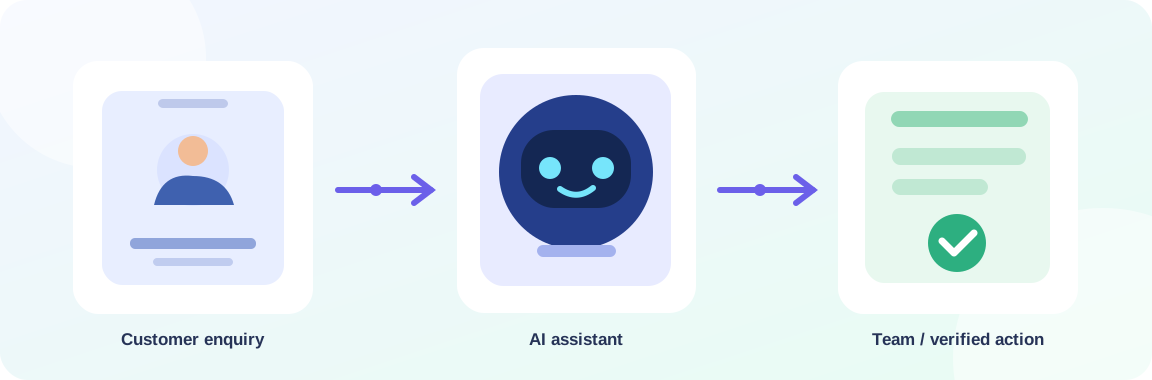
A customer contacts your business. The assistant handles routine questions. Your team gets the next action.

Customer enquiry passes through an AI assistant to the team or verified business system

Illustrative workflow — real bookings and orders require approved, tested integrations.

THE SMARTEDGE APPROACH

Six steps from idea to useful automation.

No unexplained black boxes. You'll understand what the assistant will do, what your team receives and where a person stays in charge.

01DISCOVER

We listen before we build

Spot missed calls and repetitive tasks.

See what happens

We learn how your customers contact you today, where enquiries get missed and which routine tasks interrupt your team.

  • Understand existing calls and messages
  • Identify the biggest bottleneck
WHAT YOU GETA focused problem worth solving
02DESIGN

Map the ideal conversation

Plan useful conversations and human handovers.

See what happens

We sketch the customer journey, agree the questions the assistant should ask and define what success looks like.

  • Map questions and business rules
  • Define when a person takes over
WHAT YOU GETAn agreed conversation and handoff plan
03BUILD

Create your AI assistant

Configure approved knowledge and safe fallbacks.

See what happens

We configure the assistant around your approved information, opening hours, service areas, policies and preferred tone.

  • Set up business knowledge
  • Add validation and safe fallbacks
WHAT YOU GETA working, testable prototype
04CONNECT

Give the conversation a next step

Join up the right calendars, inboxes and tools.

See what happens

When suitable connections are available, we link enquiries to calendars, inboxes, WhatsApp or other systems you already use.

  • Verify accounts and permissions
  • Connect and validate business tools
WHAT YOU GETA practical workflow with clear outcomes
05TEST

Challenge the awkward cases

Try real-world questions and awkward cases.

See what happens

We try confusing requests, changes of mind, unavailable times and questions outside the assistant's knowledge before launch.

  • Test common and unusual enquiries
  • Review exceptions with your team
WHAT YOU GETA reviewed, safer customer experience
06IMPROVE

Launch, learn and refine

Review, update and support the workflow.

See what happens

After approval, we review the agreed operational measures, update knowledge and adjust the workflow when your business changes.

  • Review handoffs and failures
  • Scope ongoing improvements
WHAT YOU GETA supportable, evolving process

Each project is scoped individually. Some businesses can start with simple enquiry capture; verified bookings, payments or CRM updates require additional integrations and testing.

CONNECT WHAT MATTERS

Your tools. Working together.

We aim to fit automation into the way your business already operates. The right solution might connect a call to an email, a WhatsApp request to a review queue, or a verified booking to your calendar.

01
Start with the channels customers use

Phone, web or messaging — whichever makes sense for your business.

02
Apply your rules and knowledge

Opening hours, service coverage, appointment requirements and safe handoffs.

03
Deliver a useful outcome

A structured enquiry, approved next step or verified action that your team can rely on.

Explore our solutions
YOUR BUSINESS, CONNECTEDEXAMPLE TOOLKIT
AI phone callsVoice and call routing
WhatsAppCustomer messages
CalendarsAvailability and requests
Workflow toolsn8n and webhooks
CRM and emailLeads and team handovers
Your teamApprovals and escalations

Connections are assessed case by case. Specific integrations depend on provider capabilities, permissions and costs.

RESPONSIBLE BY DESIGN

Smart automation should know its limits.

We design for the situations where a helpful AI response isn't enough. A good customer experience includes honest answers, verified actions and clear human handovers.

NO GUESSWORK

Approved answers only

The assistant uses agreed business information. If it does not know, it should clarify or hand off.

HUMAN IN CONTROL

Clear escalation

Safety-critical, sensitive or unusual requests reach the right person instead of being decided by AI.

VERIFIED ACTIONS

No phantom bookings

An order or appointment is only confirmed after the connected system or your team verifies it.

KEEP IT SIMPLE

We bring the build. You bring the business knowledge.

You don't need to know how to build an AI agent. We'll agree the scope together and work with the information that makes your service different.

Discover popular AI agents ↗
FROM YOUR TEAM

What we'll ask you for

  • Common customer questions and correct answers
  • Service areas, opening hours and booking rules
  • Examples of cases that need a person
  • A contact who can test and approve the flow
FROM SMARTEDGE

What we take care of

  • Conversation and workflow design
  • AI configuration and integration assessment
  • Testing, validation and agreed handovers
  • Launch support and scoped improvements

COMMON QUESTIONS

Things worth knowing before we start.

See all frequently asked questions ↗
Do we have to replace our existing software?

Usually the first step is to review what you already use. Integrations depend on provider access and compatibility. We recommend the simplest workable connection rather than a full system replacement.

Will the agent actually book appointments or take orders?

It can gather a request immediately. Confirmed bookings or orders require a verified connection to your calendar, order system or an approved staff process. We will not label a request as confirmed before it is accepted.

What if the assistant gets something wrong?

We test common failures and build in clarification prompts and escalation rules. A safe agent should be able to say it does not know and pass the request to a person.

How long does implementation take?

Timing varies with complexity, the channels involved, integration access and testing. We agree a scope and delivery estimate after discussing your actual workflow.

LET'S MAKE IT USEFUL

Your next automation starts with a conversation.

Tell us which calls, orders, bookings or manual tasks are taking time from your day. We'll explore a sensible first workflow — and the steps needed to make it reliable.

Discuss your first workflow